Today, the use of mobile applications has become widespread, and 89% of the time that Spaniards spend on mobile phones is in apps. Always carry the mobile with you or the speed of the apps, are some reasons that justify this percentage. In this article we show you how to have your WordPress in an app thanks to King of App. The first step is to register in King of App, where you only have to indicate the name, surname, email and password that you are going to use. Now, after validating the email you receive in your inbox, you can start. Once inside the Builder and from the modules section, you will have to click on «Add module». Now in the search engine we write «WordPress», to find all the modules that integrate with said CMS. Each one of them has a special feature, but we will use the «Post Pro» one, so we will click on its «Buy» button.
 It will be added to the end of the list of modules that make up our app, so we will have to drag it into the corresponding container and after that, we click on Main to be able to test it in the previewer. As we have not configured it yet, we will receive a message that warns that no posts have been found.
To correct it, we click on this warning button, going to see several fields to fill in, some of them with an asterisk (they are mandatory). After filling in this data, we save to see the final result. If you have it in a remote hosting, you would only have to copy the root domain in the same way and paste it in the URL field.
We go back to see how it turned out, but the same error message remains. This is so because, in order that no one can obtain WordPress content that is not their own, it is necessary to tell the corresponding WordPress that when our app asks for it, it recognizes it as a trustworthy place. To do this, it will be necessary to download the following plugin.
It will not be the only one that you will need to be able to go from WordPress to app, and this second plugin will make them understand each other, being able to send data in a suitable format. In this case, it is necessary to configure it from the corresponding WordPress. Finally, we return to the Builder and in case the preview does not show it, we reload the page.
It will be added to the end of the list of modules that make up our app, so we will have to drag it into the corresponding container and after that, we click on Main to be able to test it in the previewer. As we have not configured it yet, we will receive a message that warns that no posts have been found.
To correct it, we click on this warning button, going to see several fields to fill in, some of them with an asterisk (they are mandatory). After filling in this data, we save to see the final result. If you have it in a remote hosting, you would only have to copy the root domain in the same way and paste it in the URL field.
We go back to see how it turned out, but the same error message remains. This is so because, in order that no one can obtain WordPress content that is not their own, it is necessary to tell the corresponding WordPress that when our app asks for it, it recognizes it as a trustworthy place. To do this, it will be necessary to download the following plugin.
It will not be the only one that you will need to be able to go from WordPress to app, and this second plugin will make them understand each other, being able to send data in a suitable format. In this case, it is necessary to configure it from the corresponding WordPress. Finally, we return to the Builder and in case the preview does not show it, we reload the page.
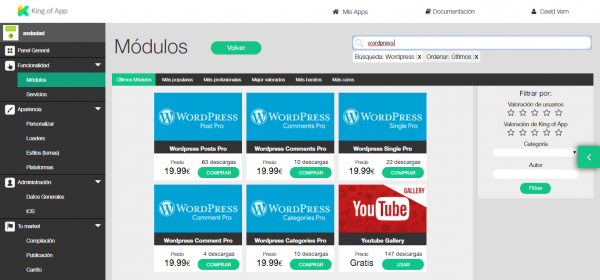 King of App offers within its platform more modules dedicated to WordPress content, with a configuration very similar to that seen above. In the event that the WordPress used has hidden content, you will need the registration and access service, with which your registered users identify themselves and can see these contents from the app.
Having your WordPress in an app will be an extra help for your followers, and it is that now they will no longer have to enter the Internet, search the blog … Thanks to an app, your users will be just one «finger» away, making them life a little easier. In addition to generating engagement, since you can include services such as analytics or push notifications, to be able to have everything under control.
King of App is an open source CMS with which you can create your app quickly and easily. With its birth in 2014, it seeks to democratize the app market and create community.
King of App offers within its platform more modules dedicated to WordPress content, with a configuration very similar to that seen above. In the event that the WordPress used has hidden content, you will need the registration and access service, with which your registered users identify themselves and can see these contents from the app.
Having your WordPress in an app will be an extra help for your followers, and it is that now they will no longer have to enter the Internet, search the blog … Thanks to an app, your users will be just one «finger» away, making them life a little easier. In addition to generating engagement, since you can include services such as analytics or push notifications, to be able to have everything under control.
King of App is an open source CMS with which you can create your app quickly and easily. With its birth in 2014, it seeks to democratize the app market and create community.